



Divi has always been a kind of theme you actually rely on to build full-scale, design-focused websites. We've been working with Divi since its early versions, and seen how it evolved over time.
However, after the launch of Divi 5, it doesn’t feel like just a new theme version or a new feature announcement. The way pages load, the way edits respond, and how the builder behaves during real work all point to a deeper shift.
While there are already plenty of videos, documentations, and guides explaining the new Divi 5 and how it differs from Divi 4, most of that content focuses on what’s announced, not how it actually plays out in real use.
So, in this blog, instead of repeating documentation or listing features, we’re sharing our hands-on experience with the new Divi 5 to see what it claims to improve versus what it actually changes in our actual workflow.
So, let’s get started.
Quick Overview of Divi Theme and Builder At a Glance
Before going to in depth analysis, here’s a quick overview of our experience with DiVi theme and builder with the latest version of Divi 5:
| Criteria | Our Verdict |
| Ease of Use | User friendly but not for absolute beginners |
| Inline Visual Editor | Real-time inline editor to create, design, customize in one place |
| Responsive Design | Advanced breakpoint control for desktop, tablet, and mobile |
| Templates & Layouts | 370 total layout packs with 2500+ pre-designed page templates. |
| E‑Commerce Tools | 25+ WooCommerce modules, cart & checkout control. |
| Marketing Tools | Built-in email plugin (Bloom) and marketing tool (Monarch), Conversion tool (DiVi lead) |
| Global Design Control | Presets, reusable styles, global variables and DiVi library storage |
| Performance & Speed | Performance: 98% (GTMatrix)Page loading speed: 1.3 s (fully loaded) |
| AI Features | Quick site building, Text, image, and code generation inside builder. |
| Site & Team Management | Site management with Divi Cloud, DiviDash, and team manage with DiVi team and DiVi editor |
| SEO Friendliness | SEO-ready structure with responsive performance that support rankings |
| Support & Community | Extensive documentation, active community, and reliable official support |
| Pricing & Value | Starting from $89/year |
| Our Overall Rating | 4.7 / 5 |
Now, let’s jump into the detailed DiVi review.
What Is Divi? Theme, Builder, and Divi 5 Upgrade
Divi is a WordPress website building platform by Elegant Themes that combines design, layout, and site management into one system. The main reason why DiVi stands out from most other page builders on the market is its dual approach of working as both a full WordPress theme and a standalone visual builder plugin
As a theme, Divi controls your entire site structure from headers, footers, templates, global styles, layouts, and all managed visually. And, as a plugin, the Divi Builder lets you create site pages and use the same visual editing experience on top of any WordPress theme.
Again, with the launch of Divi 5, a lot has changed under the hood. The major update of DiVi 5 mainly focused on performance, speed, and centralized site management.
Performance and speed are the biggest upgrades because of no reliance on shortcodes. Responsive controls are now easier to use, centralized design systems using global variables and tools like Divi Cloud and DiviDash integrate marketing with site building and management.
What really separates Divi from other builders is how deeply everything is connected. Instead of bolting a page builder onto WordPress, Divi now makes WordPress a complete site building system.
Feature Breakdown of Divi (What’s New in Divi 5.0)
Here’s a complete feature breakdown of Divi 5, and how it improves over previous versions and other page builders in terms of functionality, performance, and ease of use.
All-In One Page Management (Create, Design, Customize)
Divi has always been known for its inline editing to work directly on the page, but, its all-in-one page manager within the visual editor is the most noticeable change of Divi 5.
You can now create pages, design and make it responsive all within the same page builder without going back to the dashboard each time. When you select a text, image, row, section, module, the editing panel for that particular section will instantly open right there to adjust the settings. You don’t constantly jump between panels and previews.
Divi 5 has 3 dedicated editor sections right on your page:
- The left panel is page settings with layouts (where you can instantly create pages using saved, premade, or AI-generated designs)
- The middle section is the page builder (where you create the page)
- The right section is for customizing every element on the page (content, design, advanced).
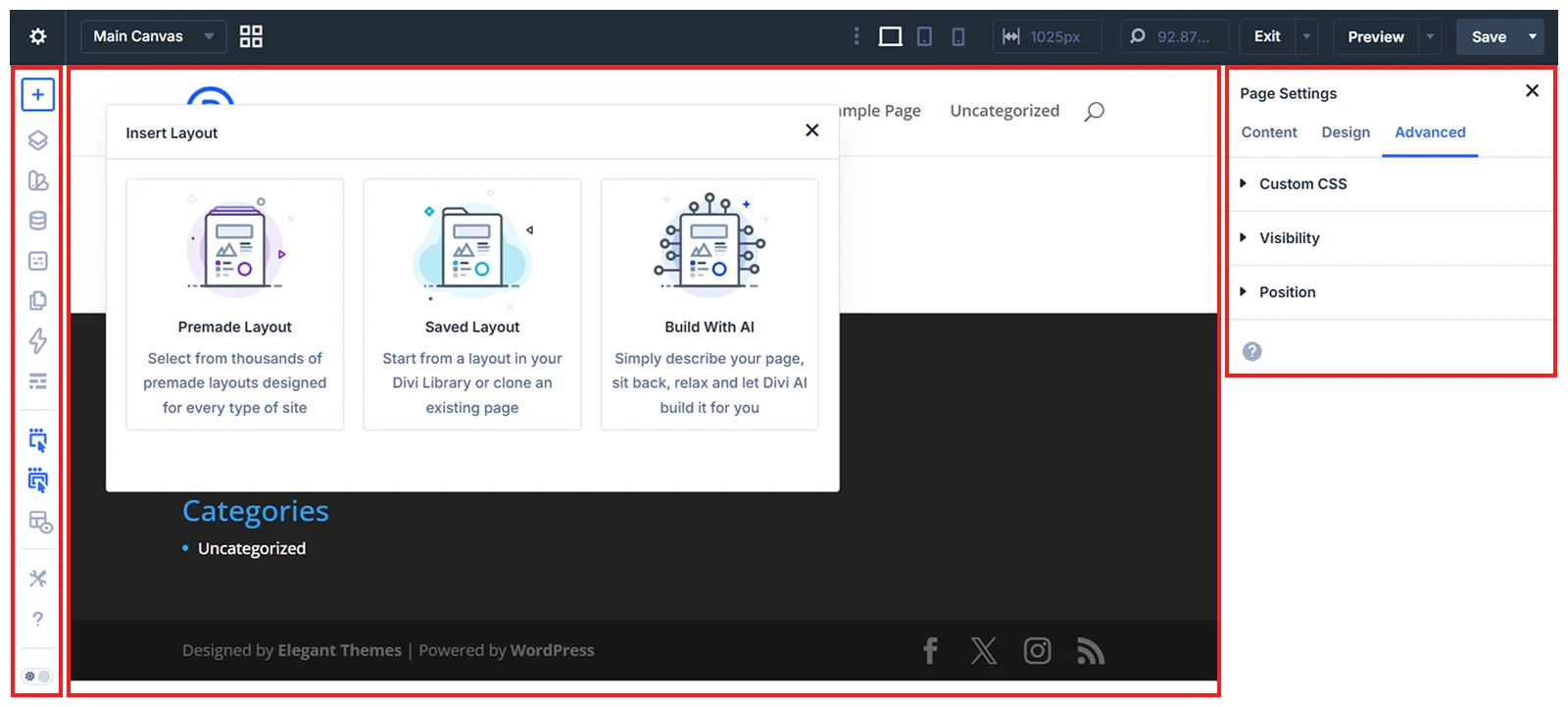
If you’ve ever worked with Figma, Divi’s inline system feels similar to it.
In DiVi 5 responsive controls for different screen sizes are in the top panel, so you can instantly check how your content looks as you edit. In Divi 4, we had to use the right responsive panel under design settings.
If we compare Divi editor with other page builders, Elementor relies heavily on sidebar editing, while Beaver Builder is simple but doesn’t offer design and edit panels like Divi.
When working on long pages, marketing sections, or client sites where content changes often, this makes a real difference.
Visual Builder within Divi Theme or Standalone Plugin for Any WordPress Theme
Divi’s Visual Builder is available in two forms. It comes built into the Divi Theme, or you can install it as a standalone plugin with another WordPress theme.
With the Divi Theme, you can build your entire website manually using the drag-and-drop builder or generate a complete site with Divi Quick Sites and AI. It can create essential pages, menus, global styles, and Theme Builder templates based on your website description.
The Divi Builder Plugin brings the same visual editing experience to third-party WordPress themes. You can create pages, use premade layouts, build site templates with the Theme Builder, and generate individual layouts and content with Divi AI.
The main difference is that the Divi Theme provides an all-in-one website-building setup. With the standalone plugin, your active theme still controls the site’s base styling and theme-specific settings.
If we compare this with Elementor or Seedprod page builders, they only offer theme and builder features to their own ecosystem, where Divi lets you build entire sites or individual pages without theme restrictions. page builders, they only offer theme and builder features to their own ecosystem, where Divi lets you build entire sites or individual pages without theme restrictions.
Advanced Page Navigation System (Layers, Wireframe, Inspector, Variable Manager)
With Divi advanced navigation system, you structure layouts in wireframe mode, locate and manage elements through Layers, analyze and refine styles using the Inspector, and customize styling with variables.
Divi’s page navigation system has always focused on making complex layouts easy to manage. One of the most impactful workflow upgrades in Divi 5 is the Inspector and the Variable Manager features for full site design management.
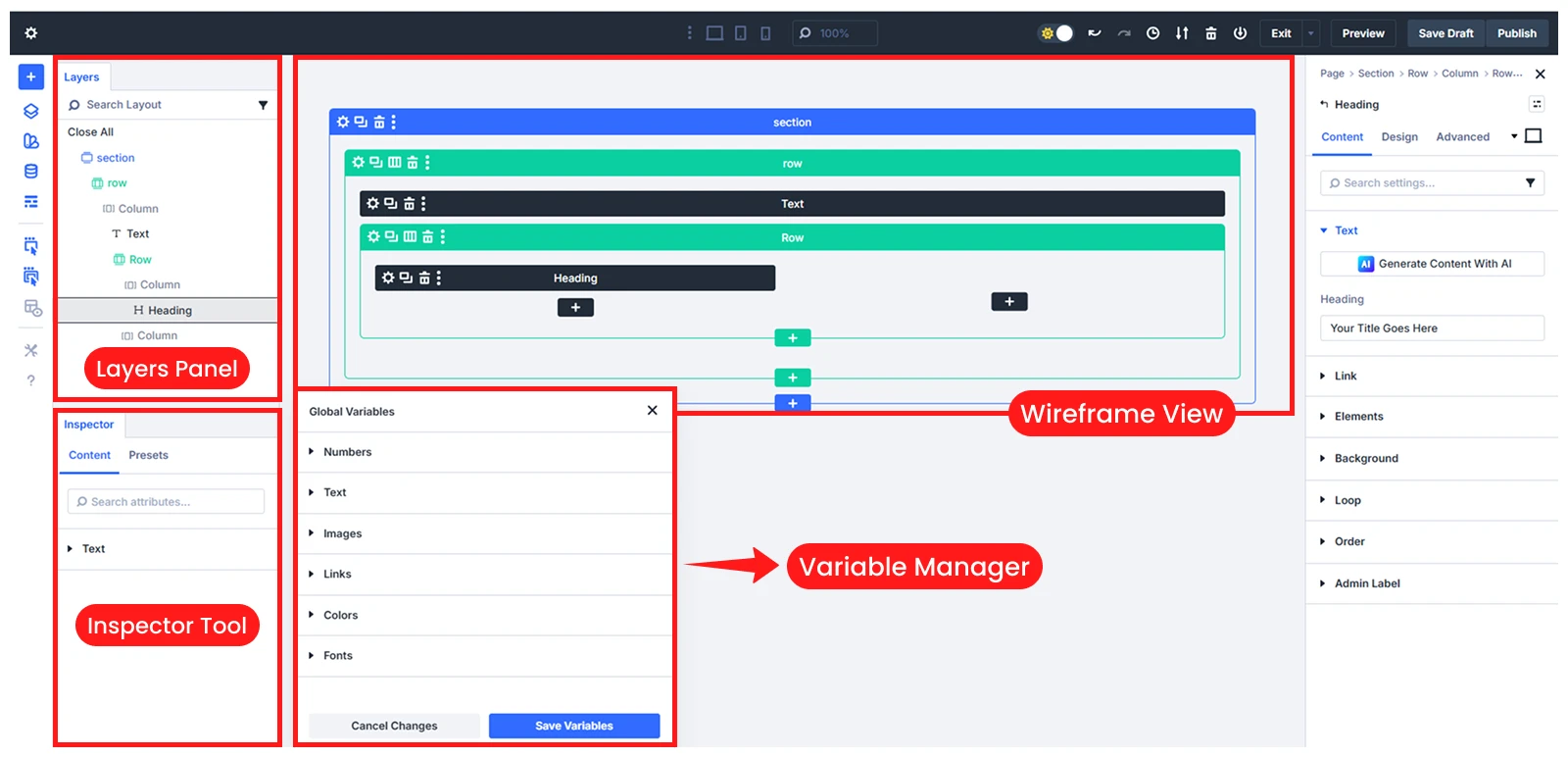
Layers Panel: Complete Layout Overview
The Layers panel shows every section, row, and module on your page in a vertical list. You can see how elements are nested and connected. With layers, you understand the page structure at a glance. You can find any element instantly without clicking randomly on the page. This is very helpful when working on long landing pages, product layouts, or multi-section websites.
Wireframe Mode: Structural Page Blueprint
Wireframe mode displays the basic structure of your page without any design distractions. It shows only the layout blocks. You can see how sections, rows, and modules are arranged to work with structure first, before focusing on design. This makes it much easier to rearrange elements, duplicate layouts, and adjust spacing accurately.
Inspector: Style and Resource Overview
The Inspector in Divi 5 includes all design values inside a selected page, module, section, or even element and its child elements. When you select a section, row, or module, the Inspector scans and collects all the attributes (fields, color, fonts, images, presets, etc) applied there. You can also use breadcrumbs in the Divi Inspector to move easily between parent and child elements.
Variable Manager: Global Design Control
The Variable Manager stores 6 main types of global design variables (colors, fonts, texts, links, images, numbers) by default in one central place. You can also add new global variables from and use these variables across your site. When you change a variable, all connected elements update automatically. For example, if you change the primary color variable, every button, heading, and background using that color changes at once.
Create Custom Page Layouts With Nested Rows, Grouped Modules, And Flexbox
With Divi, you can now design fully custom page layouts with the new featured nested rows for layered page structure, grouped modules to style all at a time, and Flexbox to get control over elements’ alignment.
Nested Rows to create Multi-Level Layouts Inside the Same Section
Nested rows are one of the most impactful improvements we’ve used in Divi 5. With nested rows, you can place rows inside columns and then add more columns inside those rows to create a multi-level layout, such as pricing sections with feature lists, comparison tables, or hero sections with mixed content and images.
Where Divi 4 only offered presets and flat row structure, Divi 5 allows nested layered layouts to align elements without overlapping especially for complex page design pages.
Group Modules Move, Duplicate, and Style Multiple Modules Together
Divi grouped modules is for combining multiple modules into a single unit and managing them together. Once grouped, you can move, duplicate, or style them all at once.
For example, when creating feature cards or testimonial blocks, you can group the icon, heading, and text so they behave as one element. So, you don’t have to adjust each module individually, you manage the group as a whole.
Flexbox Control to Align, and Distribute Elements Precisely Without Custom CSS
Flexbox controls are another major usability improvement. You can control alignment (horizontally and vertically), spacing, and distribution of elements within rows or columns. You can easily center content, align items side by side, or make sections equal in height.
Flexbox was in Divi 4 too but with custom CSS, but here, in Divi 5 we manage all without a single coding.
Design Global Variables, Presets, and Reusable Styles and Store in Divi Library
The global design system for variables, presets, and reusable styles within one Divi Library is one of the most powerful additions of Divi 5.
Create Multiple Presets for the Same Module Across Different Use Cases
You’re not limited to a single preset for each module. You can create new variables, presets, and reusable styles and store everything in the Divi Library to reuse them.
For example, you can create multiple button presets like one for landing page, another for pop ups, and another for money pages and then choose which one should be the default for new buttons.
At the same time, while with Divi 4, we can set presets for modules, in Divi 5, it expands to each option from color, font, text, etc of the module, row, column or section whatever needed.
So, you still create different pages using the presets without making every section look exactly the same.
Use Global Elements to Update Multiple Pages at Once Without Manual Editing
Global elements add another layer of control. When an element is saved as global, every instance stays connected. If the design of that element is updated such as changing the color of a button or adjusting spacing that change is reflected everywhere it appears.
When presets, global elements, and design variables are saved in one Divi Library, layouts become easier to manage, updates take less time, and long-term maintenance becomes far more predictable.
While other page builders like Elementor now offer basic global styling options, they still don’t provide the same level of integration between variables, presets, and a dedicated element library in a single workflow.
Save and Reuse Any Design Element, Module, Section, or Full Layout from the Divi Library
You create presets, global elements for your brand, but where to find them for further reuse?
Divi’s Library is here for you. You can compare it with the WordPress media library. Divi library stores all your used design elements, templates, modules instead of images.
Anything can be saved there from a simple button or text block to full sections and complete page layouts, including all content and styling. Once saved, you use these elements into any page on the same site and even exported to use on another Divi website.
This makes it much easier to reuse the best matched layouts instead of rebuilding them from scratch.
Divi Theme Builder with 45+ Modules and 370 Layout packs
Divi’s Theme Builder includes 40+ built-in modules for manual site creation and over 370 professionally designed site layout packs with total 2694 page templates in 14 niches to build complete websites without starting from scratch.
Use 45+ Built-In Modules to Create Any Type of Website Section
Whether you are creating a homepage, landing page, blog layout, or product page, you usually have a ready-made structure to work with.
The Divi modules cover almost every content element you need for modern websites, including sliders, forms, testimonials, pricing tables, galleries, blogs, call-to-action buttons, etc.
The best thing of Divi 5 Theme builder is dynamic contents with a custom loop builder. In Divi 4, we've used dynamic contents with loops for blog and product modules, but customization was limited as we couldn’t freely reorder elements, or include custom fields.
With Divi 5, you can also design fully custom loops for recent blog posts, products showcasing, and custom post types using any Divi module.
With Divi 5’s loop builder, we can now design completely custom templates for:
- Blog post listings
- Product grids
- Portfolio layouts
- Custom post types
- Dynamic content sections
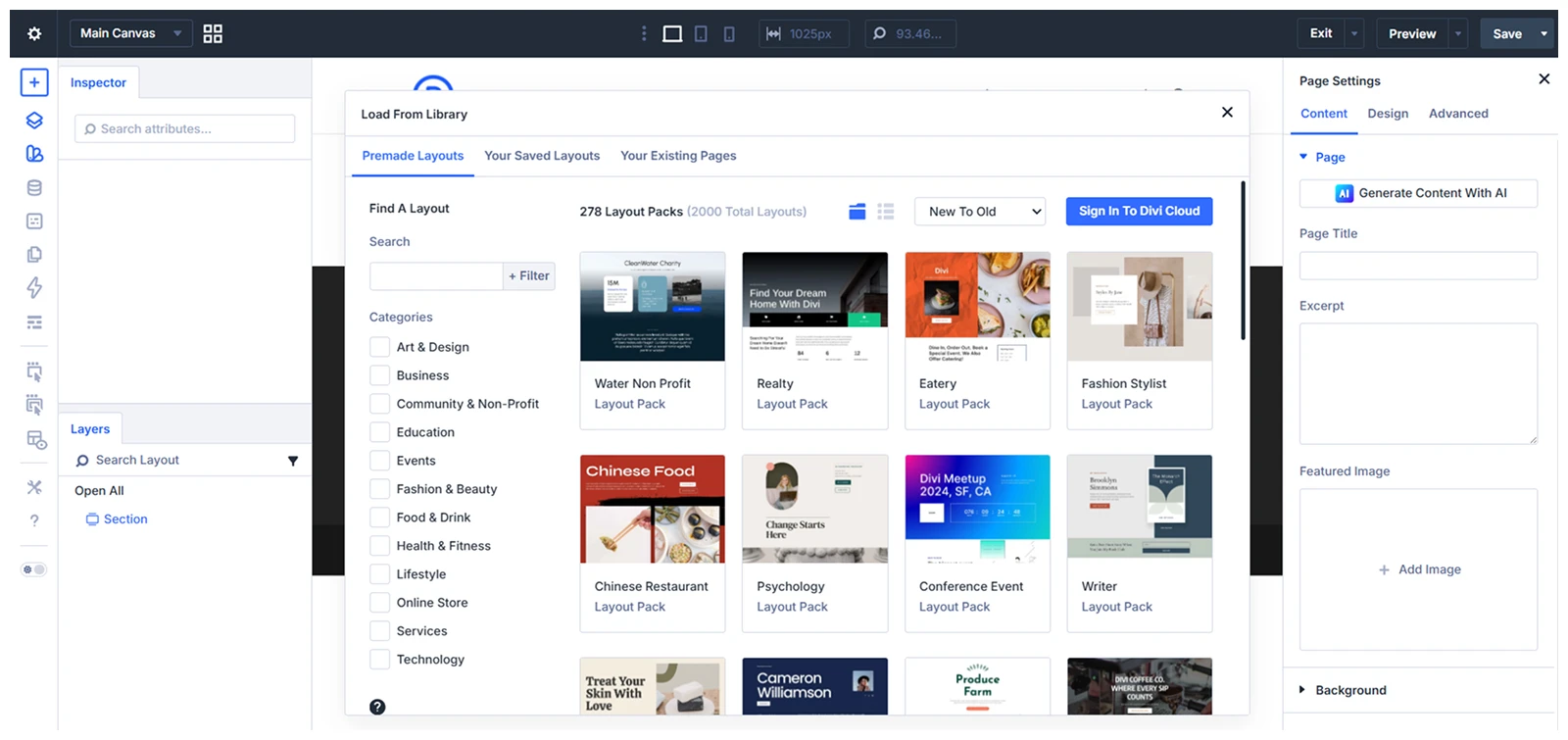
Launch Full Websites Using 370+ Layout Packs and 2,600+ Page Templates
Divi’s pixel Layout pack includes 370 full site layouts for 13 different niches, such as business, SaaS, agency, education, or eCommerce with all necessary pages (around 4 to 8). Every layout template even includes header, footer and body with global and full customizing visual editor.
The best part is, you can choose a home page from a layout pack and from a different layout pack, you can pick the about us page. Like, you can make your site mixing different templates from multiple layout packs so that you need less customization to match your site needs.
However, we never do that because it may match our site needs, but the designs vary from the packs. And, it then takes extra effort to align the overall look of the site.
So, we actually copy the particular section we like from the templates and save them into the Divi cloud library and simply use it in our site.
Advanced Color Control with Relative Colors, and HSL for Global Variables
Divi 5 introduces a much smarter color system centered around global variables, relative colors, and HSL controls from what was available in Divi 4. Instead of picking individual hex codes and hoping you use the same ones everywhere, you now define a base color variable and build a complete color system from it.
With Divi 5, this process is much more structured. You start by defining your main color variables, such as primary, secondary, accent, and background colors. Then, you create relative colors from those base values.
For example, you set a button background to be “10% darker than the primary color” or make a hover state “15% lighter than the accent color.” When the main brand color changes, all these related shades update automatically.
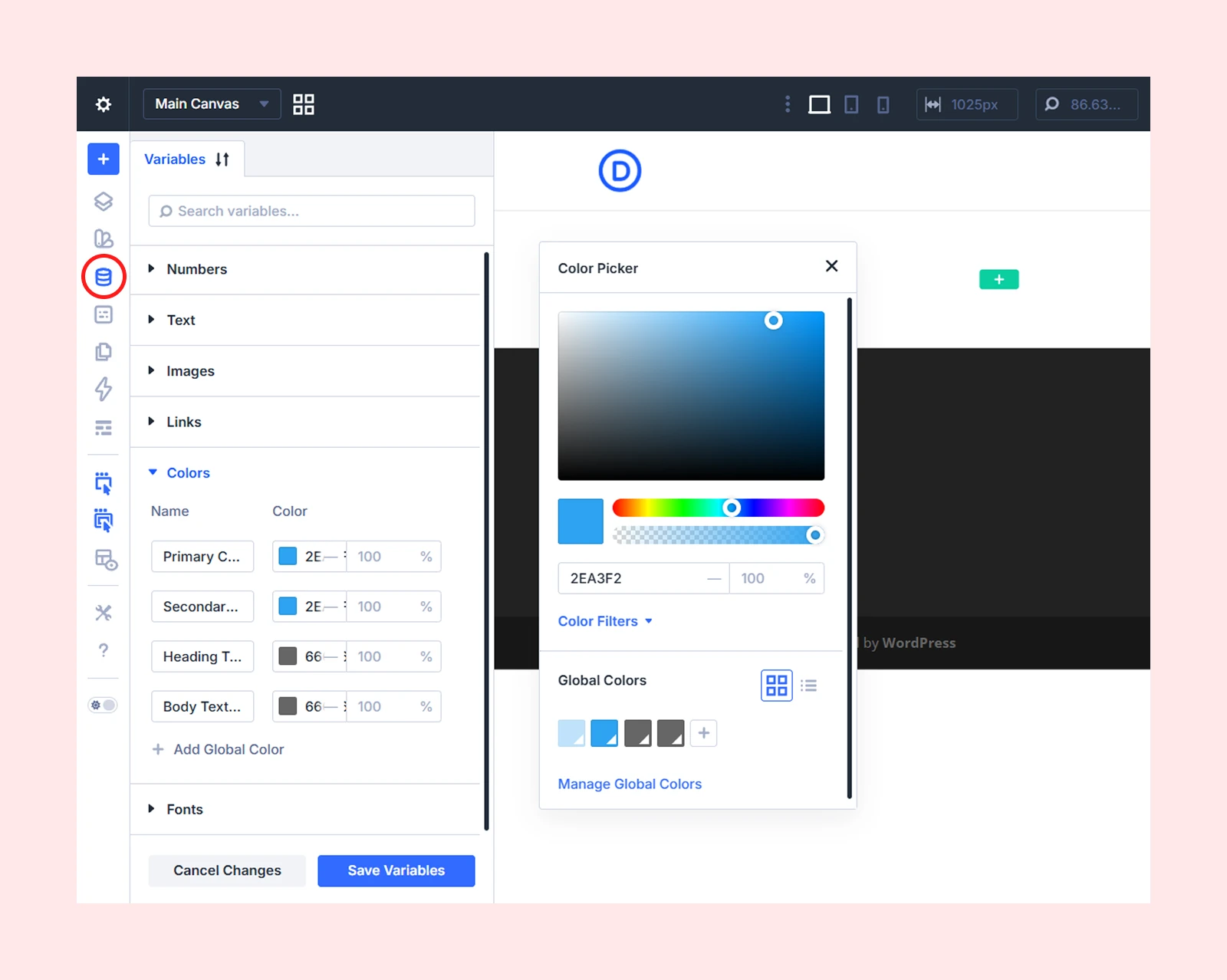
The HSL controls make these adjustments even more precise. Instead of guessing with random sliders, you directly control hue, saturation, and lightness. We use this when balancing text-heavy sections with image blocks, where contrast really matters.
WooBuilder with 25+ eCommerce Modules and Full Customization Features
Divi 5’s latest update comes with 25+ dedicated WooCommerce modules, including cart, stock, reviews, pricing, upsells, and more to control different parts of your store’s layout.
For cart and checkout pages, Divi 5 introduces 8 separate design modules, for better layout control over high-converting areas of your store. You can design inDividual sections like:
- Billing information
- Shipping fields
- Payment method selection
- Order summary
- Cart totals
- Coupon fields and more
Divi also comes with 100+ ready-made WooCommerce layout templates, covering product pages, shop archives, cart pages, and checkout designs. These templates help speed up store setup while still allowing full customization.
For WooCommerce products, Divi’s dynamic content system pulls product info like ID, stock, description, SKU, price, etc directly from the database. Again, with dynamic product data, the product details stay updated automatically, so you don’t have to fix things manually every time something changes.
Honestly, with Divi 5, it finally feels like we don’t need third-party plugins anymore to build a fully ready to sell eCommerce store.
The Loop Builder plays a major role here. You can display additional custom product fields and attributes, such as color, size variations, materials, or other specifications using Divi loop builders.
The new Group Carousel module further improves how products are presented across the store. It lets you create dynamic product sliders that automatically pull products based on specific conditions, including:
- Featured products
- Best-selling products
- Sale or promotional items
- Upsells and cross-sells
Since the carousel connects directly to WooCommerce’s dynamic product data, the content updates automatically as your inventory or product conditions change.
On top of that, Divi’s built-in AI writing tool helps generate optimized product descriptions with primary keyword targeting in just a few minutes.
Divi AI Automation Tools from Site Building to Custom Layout
Divi 5 comes with built-in AI automation tools to create sites, write page content, generate images, generate custom code to customize visual builder modules.
Divi AI automation starts with its AI Quick Website Builder, which is one of the most highlighted features in Divi 5. The process is simple — you enter your business niche, describe what your website is about, add a few details, and Divi AI generates a full website structure with core pages like Home, About, and Contact.
From our experience, it’s great for quickly creating a starting point. You get a functional, usable layout within minutes.
But even after trying different prompts, the results mostly stay at a basic-to-workable level. The structure is clean, but it doesn’t reach the depth, polish, or strategic design quality you see in professionally built Divi websites.
The high-level sites people build with Divi are usually crafted using Divi modules, proper layout planning, and professional design thinking. So if you’re aiming for that standard, we’d recommend using Divi’s modules directly or starting with a template and customizing it properly.
For content, Divi Text AI acts like your personal writing companion. You can create titles, paragraphs, or adjust tone, length, clarity, and creativity to make your content on-brand.
On the visual side, Divi Image AI lets you generate images or artwork from scratch using simple instructions. You can also edit existing images or upscale lower-quality ones to make them sharper and more professional.
For technical needs, Divi Code AI is there to write CSS, generate custom code for modules, and tweak existing elements directly in the Visual Builder. This means you can add custom features or refine designs without switching to a separate code editor.
Other popular theme builders have started adding AI features too, like Elementor’s AI Copilot. But it mostly focuses on generating text or small content pieces. It doesn’t let you build a complete page or site with AI-generated layouts, images, and code the way Divi does.
However, to use Divi AI, you need a Divi membership, with the option to upgrade to unlimited AI usage. For anyone already using Divi, it’s $24 per month. And, with Divi pro, you’ll get it inside the bundle.
Smart Site and Team Management with Divi Cloud, DiviDash & Divi Teams
Divi Cloud, Divi Dash, and Divi Teams help manage reusable designs, multiple websites, and team access.
Divi Cloud stores layouts, sections, modules, templates, and code snippets online so you can reuse them across different Divi websites. Unlike the local Divi Library, which stores items on one site, Divi Cloud makes them available across connected sites.
Divi Dash is a central dashboard for managing multiple WordPress websites. You can update WordPress, themes, and plugins, manage users, organize clients, and access connected sites from one place.
Divi Teams lets you invite team members and control their access to services such as Divi Cloud, Divi AI, Divi Dash, downloads, and support.
Divi’s Role Editor works separately. It controls what WordPress user roles can access inside the Divi Builder on an individual website.
Divi Dash and the Role Editor are included with Divi, while Divi Cloud and Divi Teams are available separately or through Divi Pro.
Get More Design, Email, and Social Power with Extra, Bloom, and Monarch
An Elegant Themes membership also includes Extra, Bloom, and Monarch alongside Divi. These are separate products, not built-in Divi 5 features.
Extra is a magazine-style WordPress theme powered by the Divi Builder. It is designed for blogs, news websites, and other content-heavy projects.
Bloom is an email opt-in plugin with 100+ templates for popups, fly-ins, inline forms, widgets, and other signup formats. It integrates with 20 email marketing providers.
Monarch is a social sharing and following plugin supporting 30+ networks, multiple display locations, and triggers for popups and fly-ins.
These bundled tools can cover basic publishing, email capture, and social sharing needs without requiring separate plugins.
Advanced Responsive Layout for All Devices (Desktop, Mobile, Tablet)
Divi 5 supports seven customizable breakpoints for phones, tablets, desktops, and wider screens. You can switch between device views from the Visual Builder or use the Responsive Editor to manage multiple breakpoints together.
It lets you adjust typography, spacing, sizing, alignment, Grid layouts, Flexbox order, and visibility for specific screen sizes. You can also use functions like clamp(), min(), and max() for fluid sizing.
For example, you can set different heading sizes for desktop, tablet, and mobile or hide selected elements on certain devices. However, every page should still be tested manually across different screen sizes.
Divi 5 performance & Speed Testing (Real time test Results)
Performance is one of the biggest improvements in Divi 5. To compare it with Divi 4, we created the same test page with text, a large image, a pricing table, and a CTA section. Both versions were tested on the same shared hosting using PageSpeed Insights and GTmetrix.
Here are the results from our test:
| Metrics | Divi 5 | Divi 4 |
| Google PageSpeed (Mobile) | 99 | 84 |
| Google PageSpeed (Desktop) | 100 | 90 |
| GTmetrix Performance Score | 96% | 81% |
| Core web vital (LCP) | 1.1s | 2s |
| Fully Loaded Time | 1.3s | 2.3s |
| Responsiveness (INP) | 1.1s | 2.1s |
In this test, Divi 5 loaded around 43% faster than Divi 4. The builder also felt more responsive while opening settings, moving elements, and editing longer pages.
Divi 5 uses a newer, modular architecture, and new Divi 5 layouts no longer depend on Divi’s legacy shortcode format. However, older layouts and unsupported third-party modules may still load the Divi 4 framework through backward compatibility.
These results reflect our specific test environment. Actual performance will vary depending on hosting, images, fonts, plugins, caching, scripts, animations, and page complexity.
Customer Support and Reviews of Divi 5
Elegant Themes provides 24/7 chat and email support with every Divi license, along with detailed documentation, tutorials, developer resources, and the Divi Support Center. Divi VIP users also receive priority support with a stated response time of 30 minutes or less.
Elegant Themes also regularly publishes updated guides covering Divi 5 migration, responsive design, Design Variables, presets, Flexbox, Grid, Loop Builder, and other new features.
Pricing, Plans & Value for Money
Divi comes with two main pricing options: Yearly access or a one-time lifetime purchase.
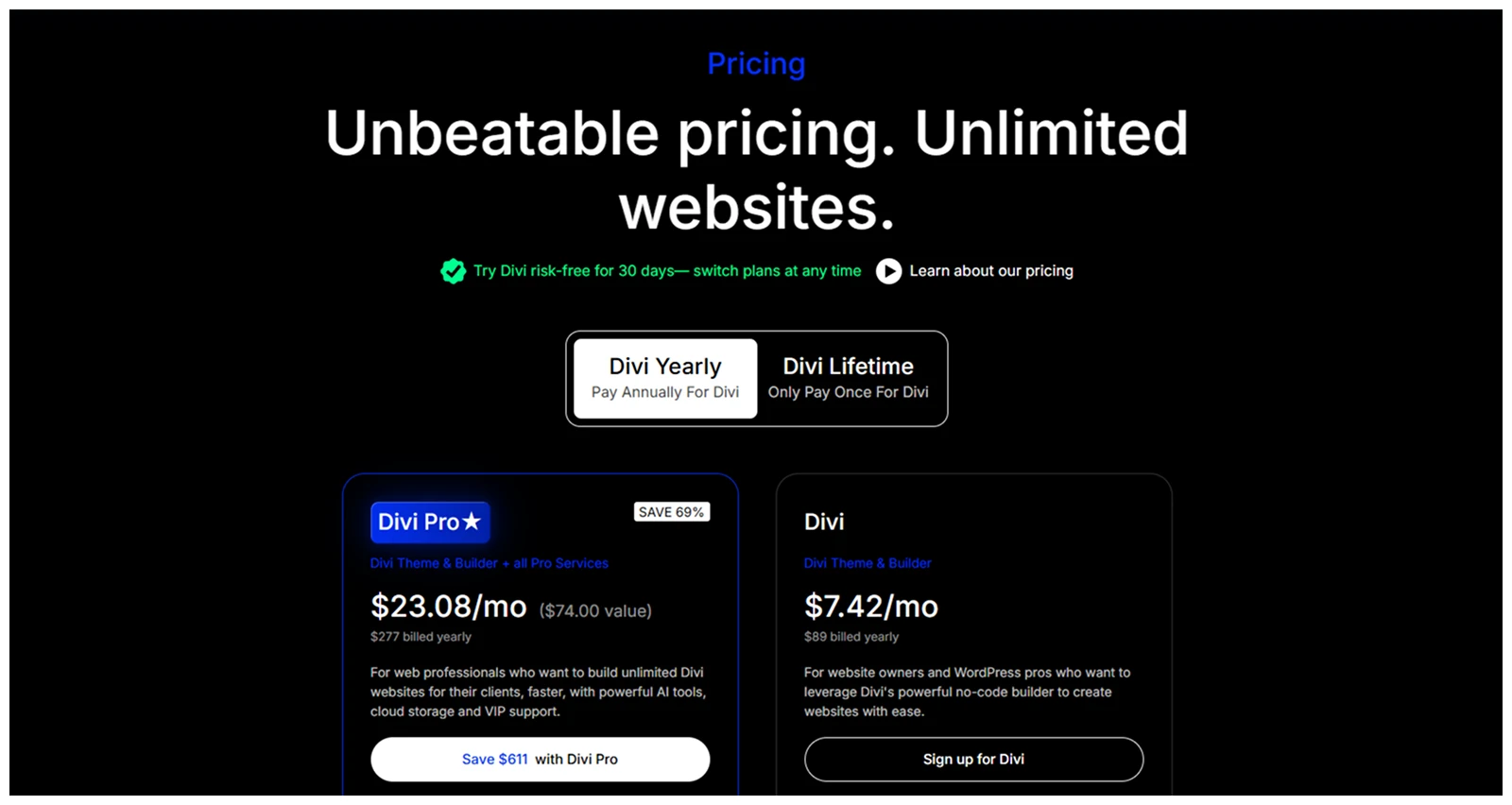
Yearly access starts at $89 per year for Divi, and $277 per year for Divi Pro, which adds extra features like Divi cloud, Divi AI, Divi team, and more.
The lifetime option costs $249 for Divi and $297 for Divi Pro, letting you pay once and avoid recurring fees.
Between Divi and Divi Pro, we recommend Divi for simple sites or stores, and Divi pro, when you’re handling mid to large sites and mostly depend on Divi rather than 3rd party tools.
The main difference is upfront cost versus long-term value is yearly plans are cheaper initially, but lifetime access is better for long-term users.
Divi Pro also includes Divi AI for AI-powered design suggestions, Divi Cloud for managing multiple sites, and Divi VIP for priority support.
For new users, the yearly plan is perfect to test the waters. For agencies or long-term builders, the lifetime plan is a smart investment. Compared to competitors like Elementor, Squarespace, or Wix, Divi offers more features at a much more competitive price.
Is Divi 5 Worth It in 2026?
From our experience and comparing Divi with other builders, Divi 5 is absolutely one of the top choices for building a new website with a reliable, all-in-one site builder as of 2026. Even with earlier versions, we loved Divi for its design flexibility and professional customization options.
Performance and speed were a concern in previous versions, but Divi 5 changes the game. Now, Divi totally cuts shortcodes, and heavy CSS which is now takes the site performance to A grade from B (Divi 4)
If we conclude the main changes areas of new Divi after the review, it’ll point;
- Page loading speed increase up to 43.5%
- Responsive breakpoints for 7 screen sizes
- Advanced design controls with inline editing
In our workflow, Divi 5 truly feels rebuilt. Features like Divi AI, Divi Cloud, and DiviDash have also changed the way we manage multiple sites and collaborate with teams
So, we recommend Divi 5, for store owners, and agencies. We won’t say Divi is for absolute beginners, but once you’ve untied that knot, it’s a solid investment to balance performance, design freedom, and advanced tools.
And if you've decided to use Divi after reading this review, our step-by-step guide on how to build a website with Divi will help you create your first website from start to finish.



0 Comments